

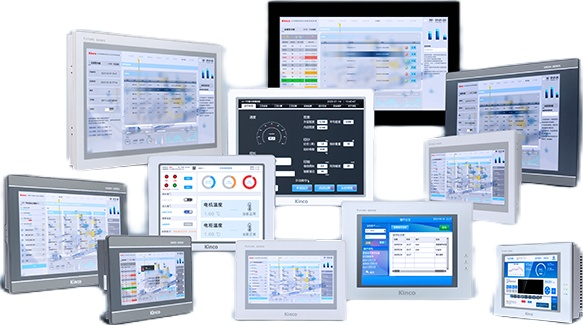
Human-machine interfaces (HMIs) connect operators with industrial machines, providing a way to monitor production status, adjust settings, acknowledge alarms, and interact with control systems. Selecting the right panel involves more than choosing a display size.
Machine builders and system integrators need to consider touch technology, communication interfaces, environmental conditions, software compatibility, and long-term maintenance.
A well-matched HMI makes machine operation clearer and supports efficient troubleshooting. The following buying guide explains the main factors to evaluate before selecting an industrial panel for a production environment.
- Define the Application and Operator Requirements
Begin by identifying who will use the HMI, what information they need, and where the panel will be installed. A packaging machine might require recipe selection, production counters, alarm messages, and maintenance screens. A complex processing line could need several levels of navigation and access permissions.
Consider the frequency of operator interaction and the consequences of incorrect input. Clear screen layouts, readable status indicators, and logically grouped controls reduce unnecessary navigation. Define these requirements before comparing hardware so the interface supports the actual workflow rather than adding functions that operators rarely use.
- Choose Between Resistive and Capacitive Touch
Touch technology affects how operators interact with a panel. A resistive touch screen responds to pressure applied to its surface, including pressure from a gloved finger or compatible stylus. This can suit industrial environments where workers wear protective gloves or need deliberate input.
Capacitive panels detect changes in electrical capacitance and typically support multi-touch gestures. They can offer a familiar smartphone-like experience, although compatibility with gloves and the operating environment depends on the specific design.
Check the panel’s touch response, surface durability, and supported operating conditions. Neither technology suits every application, so evaluate it against the operator’s actual working habits.
- Select an Appropriate Display Size and Resolution
A larger screen provides additional space for process diagrams, trends, and alarm lists, but it also requires more panel area. Smaller displays can suit compact machines with a limited number of controls. Consider viewing distance, information density, and the complexity of the interface when comparing dimensions.
Resolution determines how much detail the display can show. A higher resolution can improve the presentation of graphics and text, but poorly designed screens remain difficult to read. Test representative interface layouts at the intended viewing distance before finalizing the panel size.
- Verify PLC and Equipment Communication
An HMI should exchange data with the programmable logic controller (PLC), motion controller, inverter, or other equipment used by the machine. Before ordering, confirm supported communication protocols, serial interfaces, Ethernet ports, and the availability of suitable device drivers.
Also check whether the selected HMI supports the required number of device connections and communication interfaces. The Kinco F2 series offers model-dependent Ethernet and serial port configurations, including RS232, RS485, and RS422 interfaces. Verify the exact model’s specifications, supported protocols, and device driver compatibility before procurement.
- Evaluate Software and Configuration Tools
HMI engineering software affects how easily developers create screens, configure tags, manage alarms, and maintain projects. Review supported screen objects, reusable templates, recipe functions, data logging, and language options against the application requirements.
Check how project files are backed up and transferred between engineering computers and installed panels. Version management is particularly important when several machines share a common design. Consistent project documentation allows service teams to identify changes and maintain the installed interface over time.
- Assess Environmental and Electrical Requirements
Industrial panels operate around machinery that can generate vibration, heat, electrical noise, and dust. Review the specified operating temperature, humidity range, enclosure protection, supply voltage, and mounting method. These characteristics need to match the installation site, including cleaning practices and exposure to moisture.
Confirm the cutout dimensions and available cabinet depth before fabrication. Also allow suitable space for connectors and cables. Selecting a panel based on its appearance alone can result in mounting difficulties or environmental protection that does not match the application.
- Consider Data Visibility and Alarm Handling
Operators need to recognize abnormal conditions and understand what action to take. Clear alarm priorities, readable messages, and access to relevant machine status help distinguish urgent faults from routine notifications.
Trend displays and historical records can assist troubleshooting by showing how process values change over time. Determine whether the application requires data logging, event history, or production summaries, and verify the corresponding functions in the selected model and engineering software.
- Compare Product Range and Technical Support
A supplier’s product range matters when machine builders need different screen sizes, interfaces, or performance levels across several projects. Consistent engineering tools and documentation can also simplify training and spare-panel management.
When comparing HMI solutions, examine product specifications, configuration software, manuals, technical assistance, and replacement availability. Verify any model-specific features in the corresponding product documentation. A supplier’s general capabilities should not be treated as confirmation that every panel includes the same functions.
Select an HMI That Fits the Machine
The right HMI balances touch technology, display readability, communication compatibility, software capabilities, environmental protection, and maintenance needs. A structured evaluation helps engineering and procurement teams compare options using the same criteria and reduces the likelihood of late design changes.
Kinco Automation offers industrial HMI products for machine interfaces and automation applications. The FUTURE Series 2 (F2) HMI features a 4-wire resistive touch panel, multiple display sizes, and support for Kinco DToolsPro configuration software and EdgeAccess 2.0 remote maintenance. Review the exact model specifications, communication interfaces, mounting dimensions, and available software features to determine whether the F2 series fits the machine’s operating requirements.
